
Follow Mode
Follow Mode locks the app's tempo grid to a real record playing on your turntable — so the metronome and your Live Looper loops ride the vinyl, not the other way around.
Locking on: five taps
With the metronome on (or armed), tap the TAP button along with the record — 1 · 2 · 3 · 4 · 1 — five taps, counting the beat and landing the fifth tap on the next downbeat. On that fifth tap the app fits a beat grid to your taps and locks the metronome to the record's tempo and its "1". There's no separate arm step: the fifth tap is the arm.
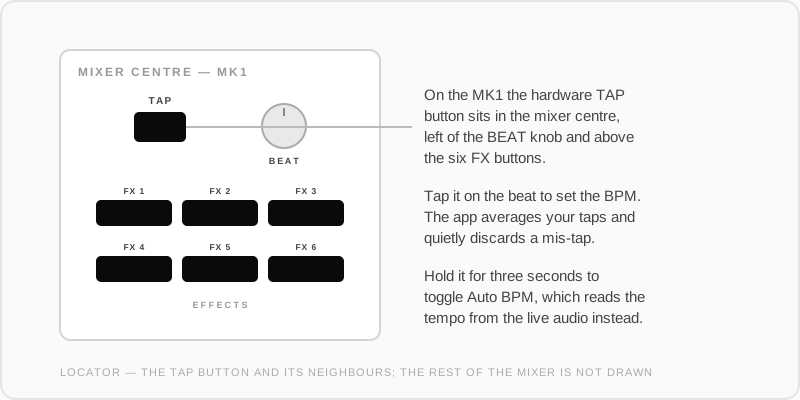
Works from the on-screen TAP button or the hardware Tap Tempo button (printed TAP).
A few things the lock forgives:
- Tap jitter is averaged out by the fit — you don't need robot timing.
- One bad tap gets detected and thrown away automatically.
- Pause too long (a couple of seconds) and the count simply restarts — no stuck state, just tap 1-2-3-4-1 again.
How you know it's working
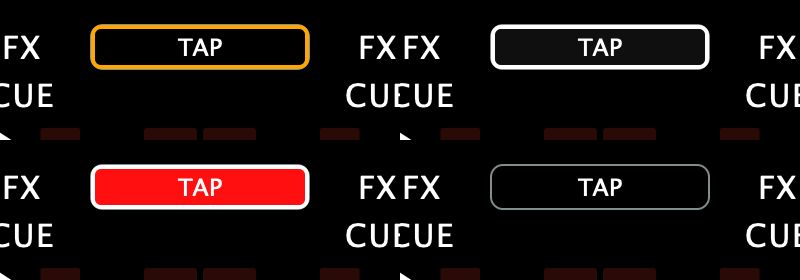
- A white outline appears around the TAP button while Follow is locked.
- The BPM number pulses green each time the app hears the record's beat — compare that flash to the music to sanity-check the lock.
- The TAP button itself keeps flashing the metronome: red on the "1", orange on beats 2–4.
Staying locked
After the lock, Follow keeps listening to that deck's incoming audio and gently keeps the metronome glued to the record as it drifts. The corrections are small and careful: when the app can't hear the beat clearly — a breakdown, a quiet passage, heavy scratching — it holds the current tempo and coasts rather than chasing noise.
If it drifts off or you change records, just tap five again — a fresh 1-2-3-4-1 re-locks at any time.
What Follow enables
Once the grid is following the vinyl, everything that syncs to the metronome syncs to your record:
- Live Looper loops record bar-snapped and play back in time with the turntable.
- The metronome click doubles as a beat reference in your headphones.
Turning it off
Turning the metronome off ends Follow (the white outline clears). Follow never touches the record — it only moves the app's grid.
Have a record you play often? Save it once as a Wax-ID and skip the tapping for good — the app can recognise the record as it starts and offer you its tempo and grid. Record analysis & grids covers making one by hand.