
← App GuideRane OneSwitch device
Platter gestures
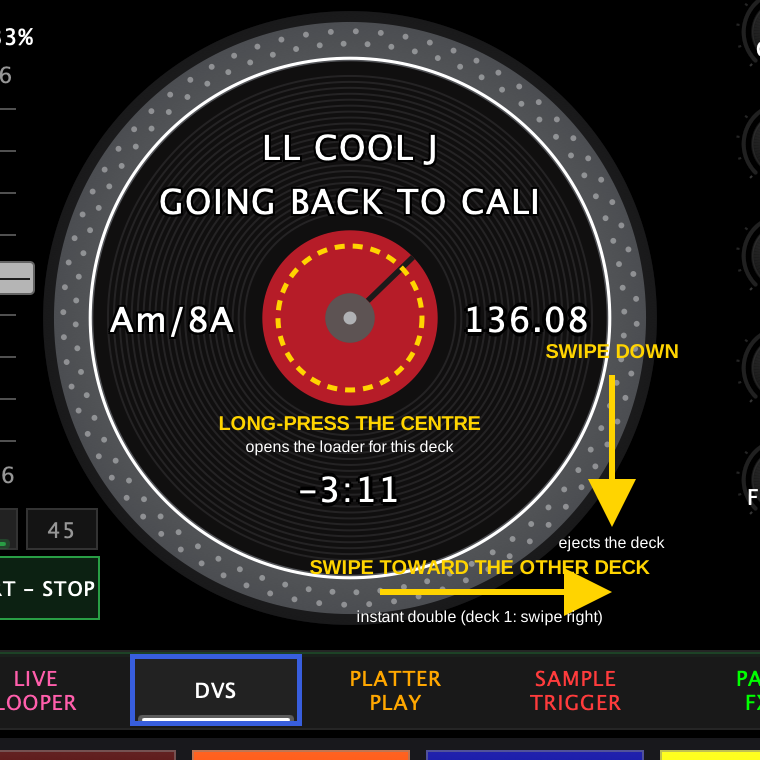
The on-screen platters respond to three gestures you won't find by tapping around. They're the fastest way to load, eject, and double tracks.
| Gesture | What it does |
|---|---|
| Long-press the center of the platter (the record label / spindle) | Opens that deck's loader — the Wax-ID Library on an analog deck, or the song browser when the deck is in DVS |
| Swipe down anywhere on the platter | Ejects whatever that deck has loaded |
| Swipe toward the other deck (deck 1: swipe right, deck 2: swipe left) | Instant double — copies the other deck's track and position onto this deck |
Tips
- With DVS active, the on-screen record tracks your control vinyl 1:1 — the long-press loader is the quickest way to switch tracks without leaving the decks.
- On a Mac or iPad you can skip the gesture entirely: the DVS view keeps the browser docked under the decks, and a track can be dragged straight onto a platter.
- Swipe-down eject works on any loaded source, so use it to quickly clear a deck before loading something new.
← All guides2026-09 UI