
Crate transfer
Send a whole crate — the music, the library data, and optionally the stems — from one device running Skratch Attach to another. Mac to iPad, iPad to Mac, or to another DJ.
⚡ Right-click a crate in the browser sidebar and choose SEND CRATE..., then AIRDROP.
Sending
- Right-click the crate → SEND CRATE...
- The card totals the crate up and tells you how big the package will be.
- Choose what to do with stems at the bottom — INCLUDE STEMS: NONE, ALL or CHOOSE. Stems are usually the bulk of the size.
- AIRDROP, or hand the file to any other share destination.
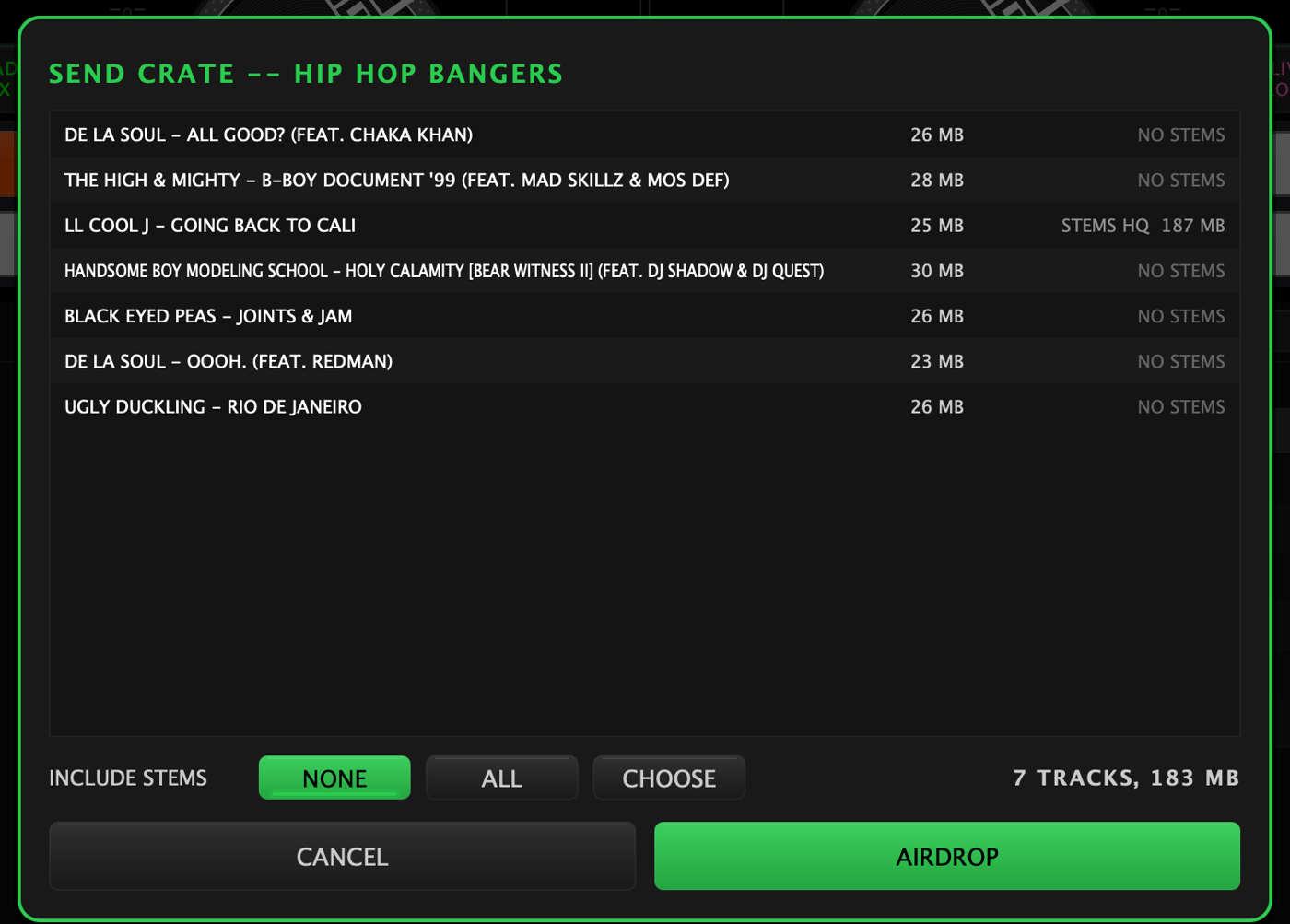
The package is a single .skratchcrate file. You can keep working while
it packs.
Receiving
Open the .skratchcrate on the other device and Skratch Attach takes it
from there. It first checks what you already have — matching by the file's
contents, not its name, so a re-send of a crate you mostly own doesn't
duplicate anything — and then offers you two ways to take it:
- ADD TO MY LIBRARY — the tracks join your library and the crate appears as one of yours.
- KEEP SEPARATE — the crate lands as a guest, in its own folder under GUESTS in the sidebar, touching nothing you already have.
If there isn't room, the app says so up front rather than half-importing.
Guest crates
A guest crate is its own folder, stems and all. It shows up in the browser like any other crate, and you can play straight out of it.
To take something from it for good, right-click the track (or a selection):
- COPY TO MY LIBRARY
- COPY + ADD TO one of your crates
- NEW CRATE FROM TRACK
Every one of those copies the file into your library. The guest copy is left as it is.
What travels with the music
- The library row — title, artist, BPM, key, genre, year.
- The beat grid and cue points, because they ride in the file's own tags.
- The stems, if you included them. A stem set arriving from another device is re-pointed at your copy of the file, so it shows HQ in the STEMS column straight away.
Wax-IDs do not travel: they describe a piece of vinyl, and the record isn't in the package.
Deleting
Two different deletes, deliberately:
- DELETE CRATE on one of your own crates removes the crate, and leaves the files in your library.
- DELETE GUEST CRATE takes the folder and the files with it — they were never in your library to begin with.
- REMOVE TRACKS FROM LIBRARY... is the explicit one: it shows you the full list of files first, asks a second time, and then moves them to the trash.