
DVS setup & troubleshooting
This page is about timecode records. If you're playing a Rane One on the control disc it shipped with, none of it applies — that's SPINDLE, there's no signal to decode and nothing here to set up.
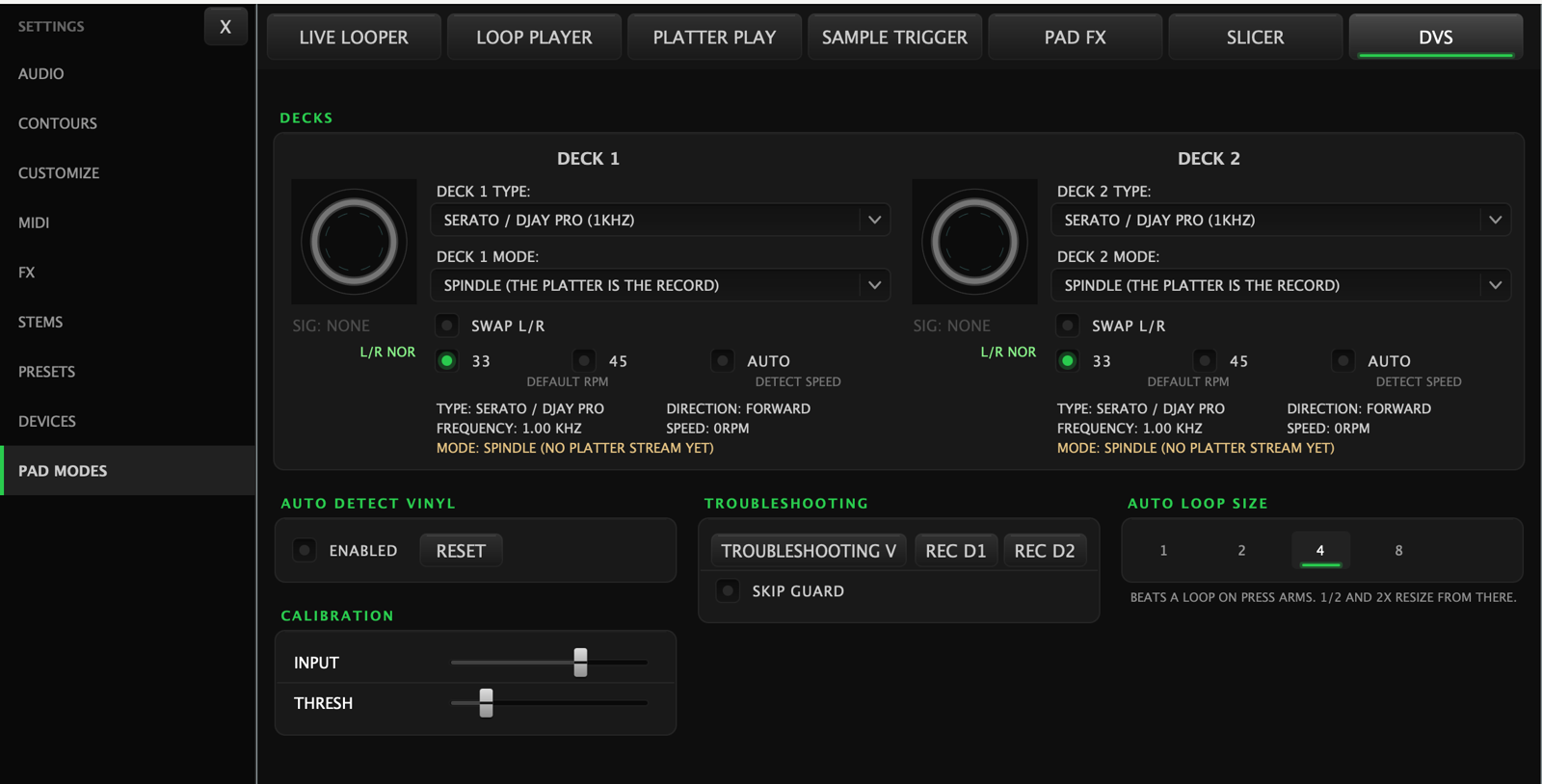
For timecode, Skratch Attach decodes control vinyl so your real records drive the software decks. The setup lives in Settings → Pad Modes → DVS — it's the last sub-page inside Pad Modes, not a sidebar row of its own.
Setup lives there; the things you change mid-set do not. Each deck's control mode has a chip in the deck button bar — see DVS control modes.
Supported control vinyl
Pick your record type from the timecode selector:
- Serato / DJAY Pro (1 kHz)
- Traktor MK1 (2 kHz) — plus a 45 Press variant
- Traktor MK2 (2.5 kHz) — plus a 45 Press variant
- Final Scratch (1.2 kHz)
- M-Audio Torq (1.2 kHz)
- Rekordbox (1 kHz)
Or leave Auto Detect Vinyl on and drop the needle — the app identifies the record for you. There's a Reset button next to it if detection has latched onto the wrong type.
Reading the status panel
Each deck shows a live readout — this is the first place to look when something feels off:
| Readout | Healthy | If not… |
|---|---|---|
| Signal | Good | "Low" — check needle, cartridge connection, and input gain (Input slider) |
| L/R | Normal | "Reversed" — your left/right channels are swapped at the turntable or cabling |
| Type | Your record | Wrong type — set it manually or Reset auto-detect |
| Speed | 33 or 45, matching your platter | Enable "Detect Speed" or set the Default RPM to match |
| Direction | Follows the record | Erratic — usually a signal-quality problem, see below |
| Mode | The deck's control mode | It also reports what the deck is actually doing right now: INTERNAL (playing / stopped / end of record), SPINDLE (platter moving / still) |
The Input and Thresh sliders tune the decoder for your setup: raise Input if the signal reads low; adjust Thresh if tracking is glitchy at low volumes or during quiet passages.
Auto loop size
AUTO LOOP SIZE sets how many beats a loop covers when you arm one — 1, 2, 4 or 8. The halve and double controls resize from there.
Sending a support report
If DVS still misbehaves, the TROUBLESHOOTING drawer at the bottom of the DVS page can capture the actual control signal so we can see exactly what the decoder saw:
- Open the TROUBLESHOOTING drawer.
- Press REC D1 or REC D2 (whichever deck has the problem).
- Reproduce the issue — scratch, ride the record, whatever triggers it.
- Press STOP. You can replay the capture to confirm it caught the problem.
- Send us the recording file with a short description.
This is the single most useful thing you can include in a DVS support request.
Quick checklist for common problems
- Deck doesn't respond to the record at all — wrong timecode type selected, or the deck's input isn't set to the phono input carrying the control signal (check Settings → Audio, phono input selector).
- Playback drifts or stutters — Signal reads "Low": clean the record, check the needle, raise the Input slider.
- Track plays backwards — L/R shows "Reversed": swap the left/right connections from that turntable.
- Pitch is off at 45 RPM — the Speed setting doesn't match your platter speed; use the 45 Press timecode variant if that's what your record is.
- The song keeps playing after the record runs out — that's the end-of-record fallback doing its job, not a fault. See DVS control modes.