
DVS control modes
A control mode decides what drives the song on a DVS deck. There are four, and they are per deck — deck 1 can be following a record while deck 2 plays on its own.
⚡ The mode chip lives in the deck button bar, right next to the DVS chip, and it only appears while that deck is in DVS. Tap it and pick from the menu: ABSOLUTE / RELATIVE / INTERNAL / SPINDLE.
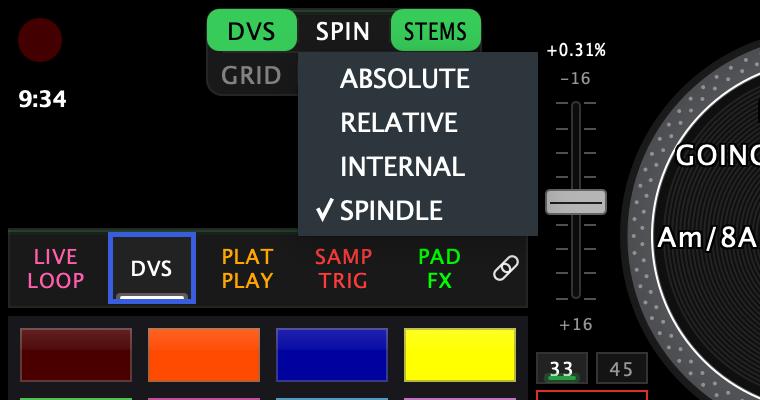
The chip reads REL · ABS · INT · SPIN. The same setting also lives in Settings → Pad Modes → DVS, per deck, which is where it persists — but you never have to leave the decks to change it.
Which one is for you depends on what's on the platter. Playing a Rane One on the control disc it came with? That's SPINDLE, and it needs no setup at all. RELATIVE and ABSOLUTE are the timecode-record modes. INTERNAL needs nothing on the platter.
RELATIVE — the record is a controller
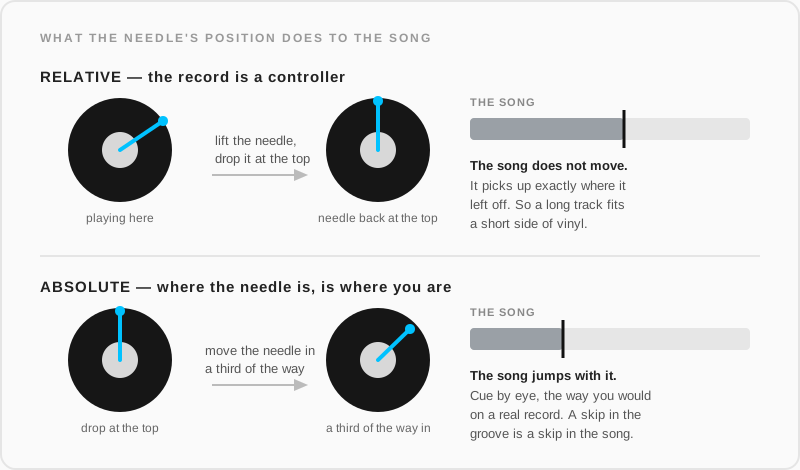
The default. The record gives the app speed and direction, not a place in the song — scratch it, ride it, spin it back, and the song follows your hand. Picking the needle up and dropping it somewhere else does not move the song: it picks up where it left off.
So a long track works on a short side of vinyl. Run out of record, lift, drop back at the top, keep playing.
ABSOLUTE — where the needle is, is where you are
The song is pinned to the record. Drop the needle a third of the way in and you land a third of the way into the song; drop it at the top and you're back at the beginning.
Absolute is a mapping, fixed the first time the deck reads the record cleanly after you enter the mode. Every clean read afterwards corrects the song back onto it, so the track and the record stay locked together.
A skip is a skip: if the needle hops a groove, the song hops with it.
INTERNAL — no record at all
The deck plays on its own, with no timecode and no platter. The START – STOP box beside the platter is the transport, and the deck ignores the controller's own start/stop and the platter.
Use it to prep a track, play something out while you work on the other deck, or run the app with no turntable at all — it is also how Standalone mode plays.
Switching a playing deck into INTERNAL keeps it playing. It does not stop and wait for you to press START.

SPINDLE — the control disc on the spindle
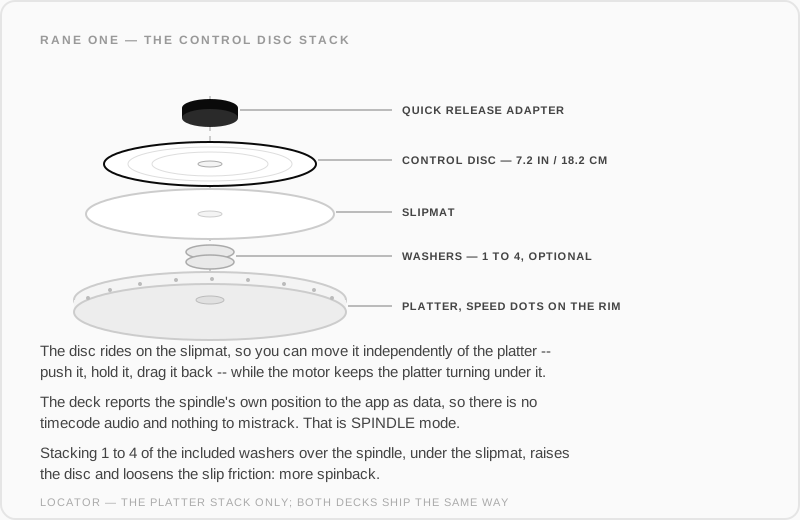
This is how most people play a Rane One, and it needs no timecode record: the deck ships with a Control Disc that locks onto the spindle, riding on a slipmat over the platter. The disc is what drives the song.
The spindle turns with the motor, so left alone the disc carries the track along at playing speed. But because it sits on a slipmat you can grab the disc and move it independently of the platter — push it, hold it, drag it back — and the song goes with your hand while the platter keeps spinning underneath. That is what makes it scratch like a record.
No needle and no timecode audio are involved. The deck reports the spindle's own position to the app as data, which is why the tracking is exact: there is no signal to decode and nothing to mistrack.
Want more spinback? Rane's own setup note: stacking 1–4 of the included washers over the spindle, under the slipmat, raises the disc and loosens the slip friction.
Spindle is offered on decks that report their spindle position (the Rane One family); elsewhere the option isn't in the menu.
The end-of-record fallback
DVS decks watch for the lead-out. If the control signal dies where the record is about to run out, the app doesn't stop the song dead — it keeps playing it internally until the vinyl has something to say again, then hands control back.
You'll see it in the DVS status panel as Mode: INTERNAL (end of record).
Which one when
| You want to… | Mode |
|---|---|
| Scratch, juggle, mix normally, on timecode vinyl | RELATIVE |
| Cue by eye, the way you would on a real record | ABSOLUTE |
| Play with no vinyl involved | INTERNAL |
| Play the way a Rane One is meant to be played, on its control disc | SPINDLE |
See also
- DVS — getting a deck into DVS, and the two banks
- DVS setup & troubleshooting — control vinyl types, signal health, capture reports