
Slicer
The beat slicer for Live Looper: hold a pad and it stutters a slice of your master loop in time; let go and the loop carries on exactly where it should be. Slicer is a Live Looper-only overlay — it works on top of your running loops and never touches them.
⚡ To use it: press SHIFT + LOOP OUT (the button printed x2) on the deck you want — the deck must be in Live Looper. The slicer appears on the on-screen pads. Same press turns it off.
Turning it on and off
Press SHIFT + LOOP OUT — the button printed x2, right of the pads — to toggle Slicer for that deck. It only engages while the deck is in Live Looper.
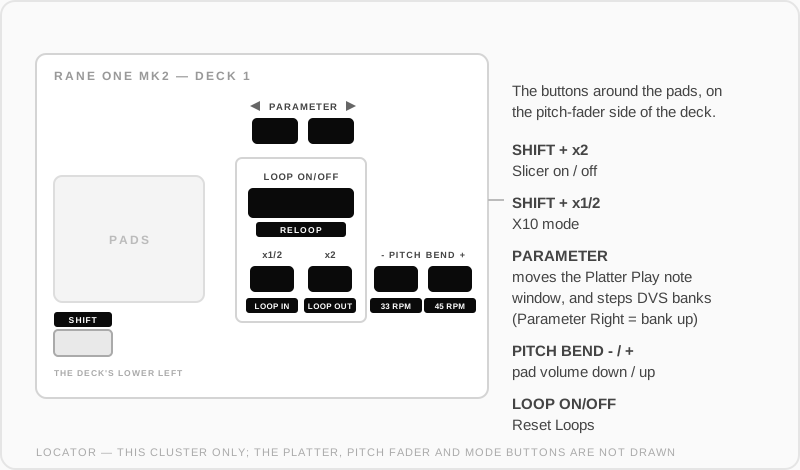
Slicer never takes over the pads Live Looper is using — it takes the other pad surface:
- Normally that means the on-screen pads. The on-screen pad mode bar switches to "Slicer" (in amber), your hardware pads keep running Live Looper, and the on-screen pads become the slicer.
- To flip it onto the hardware pads instead, put Live Looper on the on-screen pads (tap it on the on-screen pad mode bar). Slicer moves to the opposite side — the hardware pads — and the LOOP OUT button LED shows its state there: blinking while it waits for a loop, solid once the slicer is live.
No master loop recorded yet? Slicer waits quietly (pads stay dark) and comes alive the moment a master loop exists.
Reading the pads
The pads become a map of your master loop, and the lit pad is the playhead chasing through it:
- A 1-bar loop uses pads 1–4 (one slice per beat); pads 5–8 stay off.
- Longer loops use all 8 pads for the current bar.
- The lit color is the loop's bar group: it changes every 2 bars as the loop plays through (green for bars 1–2, red for 3–4, and so on), so you always know where in a long loop you are.
Stuttering
- Hold any pad — on the next 16th note, that slice starts repeating at a 16th-note rate while the loops duck underneath.
- Release — the loops come straight back, right where they would have been. They never stop playing under the stutter, so nothing drifts.
- Faster stutter (32nd notes): hold LOOP IN (printed x1/2) while pressing a pad on the hardware slicer, or Shift on the on-screen slicer.
- Last press wins: press a second pad while holding one and the stutter switches slices on the next 16th, seamlessly.
- Both decks have their own independent slicer — you can stutter both at once.
Everything is quantized to the loop's own grid, so a stutter can't land off-beat.
Good to know
- Multiple loops playing on the deck? The stutter slices all of them together — it's a snapshot of the deck's whole loop mix.
- While Slicer holds the hardware pads, the LOOP ON/OFF button still resets your loops, so you can kill everything without exiting Slicer.
- Switching the deck out of Live Looper suspends Slicer; switching back restores it, still on, exactly as you left it.
Settings
Settings → Pad Modes → Slicer sets how long a held slice repeats for:
| Setting | What it does |
|---|---|
| Default Stutter Length | The repeat length a held pad uses |
| Secondary Stutter Length (Loop In) | The faster length you get while holding LOOP IN |
